Easy-Peasy.AI Review 2025 – 90+ Templates, Chat, Images & Transcription in One

Easy-Peasy.AI Review 2025 – 90+ Templates, Chat, Images & Transcription in One Workspace
🔗 Ref link: Easy-Peasy.AI — https://easy-peasy.ai/?via=dong-nguyen-hoang
Snapshot
-
Category: All-in-one AI content suite (writing, chat, images, transcription)
-
Best for: Solo creators, marketers, agencies, and small teams that want fast, template-driven content without juggling multiple tools
-
Our Score: 8.8/10 – Generous template library, smooth chat, built-in image+audio tools. UI is simple (not flashy), but the output quality and speed impress.
What is Easy-Peasy.AI?
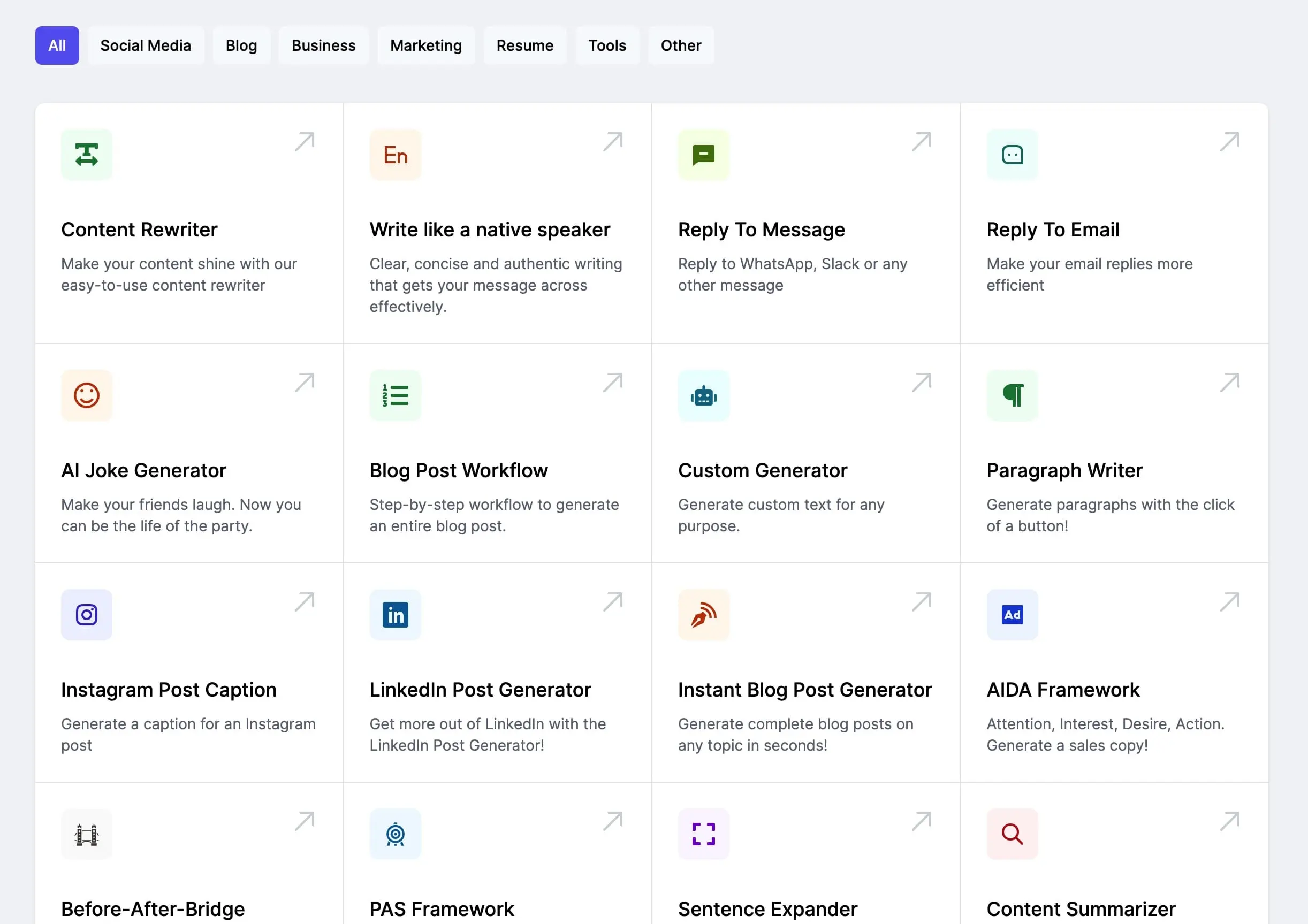
Easy-Peasy.AI is a compact, creator-friendly toolbox that bundles AI copywriting (90+ templates), a freeform Chat, document drafting, AI image generation, and audio transcription in one place. The platform aims to be an “everyday” assistant—quick prompts in, publishable assets out—so you can draft blog posts, emails, captions, and ads, then spin up matching visuals and transcripts without leaving the app.
Public user feedback highlights ease of use, helpful templates, and responsive support; many reviewers call it a “pleasant surprise” versus larger, pricier suites. A few wish the UI looked more modern, but still rate the app highly for productivity.
What users say (highlights)
-
“User-friendly, intelligent, accurate—great for content writing; love the 90+ copy templates.”
-
“Fantastic for work (emails, notes) and personal writing; grammar worries gone.”
-
“Great value; we generate social tags and trend insights to reach a wider audience.”
-
“Training custom models is a breeze.”
-
Minor nit: UI could look more modern, but functionality wins out.
Key Features
-
90+ Writing Templates – From blog workflows and outlines to email replies, cold emails, YouTube/LinkedIn/Quora content, ad copy, product descriptions, and more.
-
Chat (real-time) – A conversational workspace for ideation, rewrites, expansions, and quick answers; keeps a history you can revisit.
-
Documents – Long-form drafting with tone, length, and language controls; create emails, blogs, essays, or freestyle copy in a clean editor.
-
AI Images – Prompt-to-image with style/artist/dimension controls; handy for thumbnails, social posts, blog headers.
-
Transcription – Upload audio to generate accurate text transcripts fast—useful for podcasts, interviews, webinars, and YouTube repurposing.
-
Languages & Tones – Multilingual outputs and tone sliders (friendly, funny, professional, etc.) to match brand voice.
-
Workflows – Prebuilt flows for common jobs (e.g., blog post or job description pipelines), with more rolling out.
Pros & Cons
Pros
-
All-in-one: writing, chat, images, and transcription under one roof—no tool-hopping.
-
Strong prompt controls (tone, output length, number of variants, language).
-
Template breadth (90+) reduces blank-page time and standardizes team output.
-
Beginner-friendly but fast enough for power users; copy/paste/like/favorite flows are snappy.
-
Good for social: captions, hooks, hashtags, and repurposing via transcript → post.
Cons
-
UI is clean but not the most “designer-polished.”
-
Advanced SEO suites (entity maps, technical briefs) aren’t the core focus; pair with an SEO tool if you need deep on-page analysis.
-
As with any AI tool, outputs benefit from human editing and brand guidelines.
Who Should Choose Easy-Peasy.AI
-
Solopreneurs & creators who want a single app for copy, images, and transcripts.
-
Agencies & small teams needing repeatable templates (emails, ads, social posts) to keep tone consistent and content flowing.
-
Educators/ops teams repurposing audio→text and creating multilingual variants quickly.
Consider alternatives if you require heavy-duty SEO suites, advanced design tooling, or complex long-form research features out of the box.
Quick Setup Path
-
Pick a template (e.g., “Blog Post,” “Cold Email,” “IG Caption”).
-
Set tone + length + language, then generate 2–5 variants for fast A/B selection.
-
Use Chat to tighten, rephrase, or localize.
-
Create matching AI images for the post or ad set.
-
If you have a podcast/video, transcribe it and repurpose into threads, captions, and newsletters.
-
Save favorites and standardize prompts so your team reuses what works.
Bottom Line
Easy-Peasy.AI nails the 80/20 for modern content teams: fast templates, a helpful chat, and built-in image/transcription so you can ideate, draft, and package deliverables in one sitting. It’s not the flashiest UI, but output quality, speed, and breadth of templates make it a high-ROI daily driver.
Score: ⭐⭐⭐⭐⭐⭐⭐⭐✩ (8.8/10) — A nimble, budget-friendly one-stop AI content studio.
 https://easy-peasy.ai/?via=dong-nguyen-hoang
Social Caption
✍️ Need copy, captions, images, and transcripts—fast?
Easy-Peasy.AI packs 90+ templates, chat, AI images, and audio transcription into one clean workspace.
👉 https://easy-peasy.ai/?via=dong-nguyen-hoang