Supercreator.ai Review (2025): Fastest iPhone Workflow for TikTok, Reels & Shorts

Supercreator.ai Review 2025 – The Fastest Way to Turn Ideas into Short-Form Videos (iPhone)
🔗 Ref link: https://www.supercreator.app/?ref=ntk1zdn
Verdict ( TL;DR )
Score: 8.9/10 — If you make TikTok/Reels/Shorts and you’re on iPhone, Supercreator is one of the quickest ways to go from idea → script → recorded → captioned → exported. Free plan is generous, editing is shockingly fast, and the teleprompter + “Super Edit” trims dead air and adds captions in seconds. Downsides: iOS-only (no Android), occasional bugs, and built-in captions/hashtags can be generic—so you’ll want to tweak them.
What Supercreator.ai Is
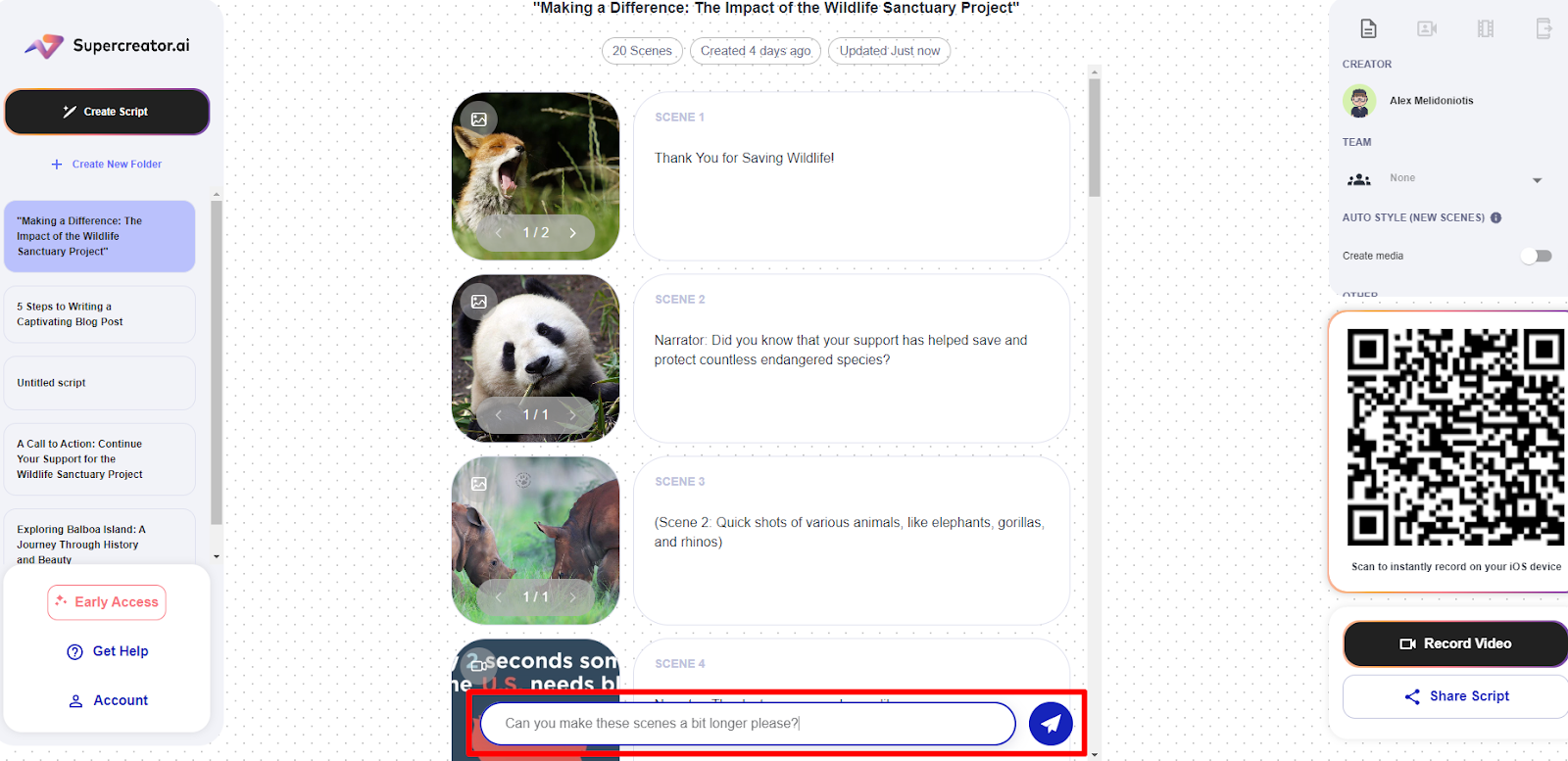
A mobile-first (iOS) AI assistant for short-form video. You feed it a topic, link, or thread; it drafts a scene-by-scene script, provides assets, lets you record with an on-screen teleprompter, and then auto-edits with captions, trims, and platform formats (9:16, 1:1, etc.). Export and post—done.
Best for: Solo creators, coaches, founders, marketers who need consistent daily/weekly short videos without complex editing.
Standout Features
-
AI Script Generation
Input free text, a blog/URL, even an X thread or YT link. It returns a multi-scene script you can rephrase, shorten, expand, or retone (“professional”, “funny”, etc.). -
On-screen Teleprompter
Adjustable speed and layout so you keep eye contact with the lens while reading. -
“Super Edit” (1-tap polish)
Auto-trim silences, add kinetic AI captions (trendy styles), auto titles. Manual tweaks allowed. -
Assets, Filters & Greenscreen
Stock/AI images for backgrounds, AR/green-screen looks, and playful filters to improve watch time. -
Auto Formatting + Posting Aids
Export in platform aspect ratios; get suggested titles/captions/hashtags (good starting point—edit for niche targeting). -
Desktop Companion (early access)
Draft scripts on desktop, scan a QR to send to your phone for recording.
What We Loved
-
Speed: 10–20 minutes from idea to finished Reel/Short when you get into a rhythm.
-
Beginner friendly: You don’t need editing chops.
-
Free plan is real: Up to 5 videos/month with most features, watermark applied.
-
Affordable upgrades: Remove watermark and lift limits without breaking the bank.
Where It Falls Short
-
iOS-only: No Android app yet.
-
Occasional bugs/crashes: Save often; long takes can sometimes hiccup.
-
Generic SEO copy: Auto titles/hashtags are broad—refine to niche tags for reach.
-
Source parsing hit-or-miss: X/YouTube imports sometimes need manual cleanup.
Pricing (typical)
-
Free: 5 videos/month, watermark, most features.
-
Silver (~$9.99/mo): ~10 videos/month, no watermark.
-
Gold (~$24.99/mo): Unlimited videos, no watermark.
Annual billing often saves ~60% vs monthly.
Recommendation: Start Free → if you like the flow, jump straight to Gold for volume. Silver’s headroom over Free is small.
Quick Start (10–20 min workflow)
-
Topic in → script out: Paste your idea/link. Ask for tone & target audience.
-
Tighten the script: Use “rephrase/shrink/expand/change tone.” Swap any weird assets.
-
Record with teleprompter: Keep clips short (1–3 sentences each).
-
Tap “Super Edit”: Auto-trim silences + add captions. Skim and tweak.
-
Export in 9:16: Manually refine title/description/hashtags for your niche and post.
Pro tips for better reach
-
Replace broad tags (#productivity) with mid-tail niche tags (#timeblockingtips, #deepworkroutine).
-
Keep hooks under 3 seconds; front-load value.
-
Use pattern interrupts (angle changes, B-roll, punch-in zooms).
-
Batch 5 scripts at once; record in one sitting.
Who Should Use It
-
Creators/SMBs posting 3–30 short videos/month
-
Thought leaders/coaches converting blogs/newsletters into Reels/Shorts
-
UGC/paid social teams prototyping fast
Who should skip: Android-only users, long-form editors, and teams needing multi-track desktop timelines.
Alternatives to Consider
-
CapCut (mobile/desktop): Strong editing, templates; less AI script flow.
-
Descript: Desktop text-based editing + overdub; better for long-form to clips.
-
Veedeo/Snap-tools: Trend filters, but weaker script workflow.
 https://www.supercreator.app/?ref=ntk1zdn
Bottom Line
If your bottleneck is time to produce, Supercreator on iPhone gives you a legit “idea → polished short” pipeline with the least friction right now. Use its AI for momentum, then human-edit titles, hooks, and tags to win the algorithm.
👉 Start here: https://www.supercreator.app/?ref=ntk1zdn
Social Caption (you can paste this)
Create TikTok/Reels in 10–20 minutes: AI script, teleprompter, 1-tap edits + captions. iPhone only, free plan available. Try Supercreator → https://www.supercreator.app/?ref=ntk1zdn