ZoomShift Review 2025 — Simple Employee Scheduling & Time Tracking (Pros, Cons, Pricing)

ZoomShift – Quick Review 2025
Snapshot
-
Brand / Site: ZoomShift — https://zoomshift.com?fpr=dong67
-
Category: Employee scheduling & time tracking (web + mobile)
-
Reputation: Simple, reliable staff scheduling with helpful support. Great for shifts, availability, and coverage; UI feels a bit dated and a few workflow gaps reported.
-
Best for: Small–mid teams with hourly staff (hospitality, retail, nonprofits, campuses) that want clean schedules, timesheets, and basic payroll handoff.
 https://zoomshift.com?fpr=dong67
What’s Good
-
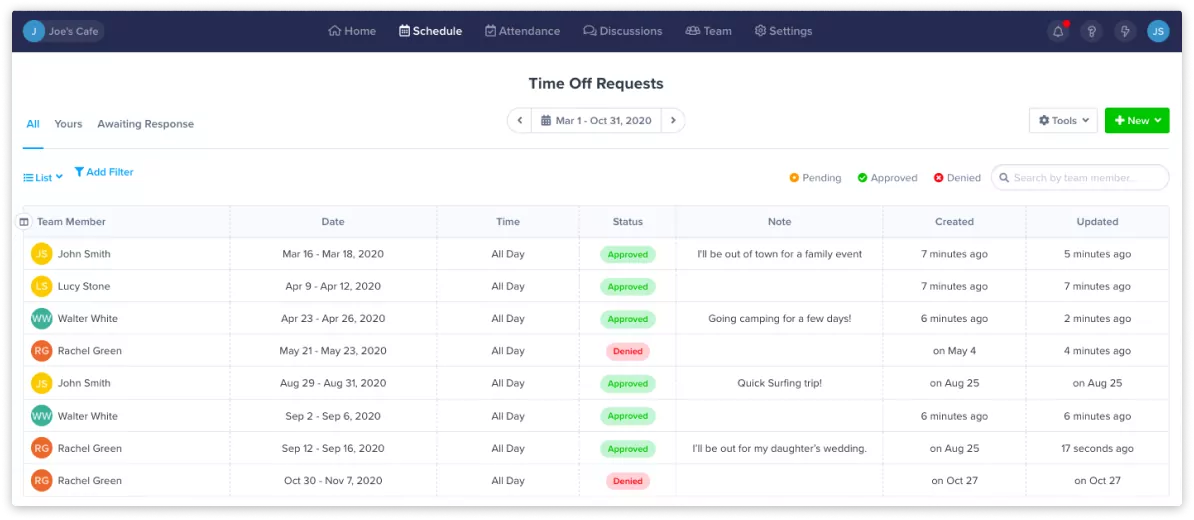
Fast, clear scheduling: Copy/paste shifts, set positions, manage availability & PTO in one place.
-
Shift coverage & swaps: Built-in requests help teams self-solve conflicts.
-
Time tracking & timesheets: Keep hours tidy for accurate payroll.
-
Notifications that work: Reminders and updates via web + mobile apps keep everyone aligned.
-
Support that shows up: Quick, friendly help (shout-outs in reviews to specific agents).
-
Roster controls: Easy add/remove or archive seasonal workers to save seats.
Watch-Outs
-
UI feels dated: Works fine, but design could be more modern.
-
Missing niceties: No “apply to open shift” pool and no auto-approve coverage until X hours—both requested by users.
-
Session friction: Some staff wish they could stay logged in longer.
-
Seat billing gotchas: If you archive/remove people but forget to update seats, you can get charged for extras.
Who It’s For
-
Owners/managers who need straightforward scheduling + time tracking without an enterprise learning curve.
-
Programs with rotating/seasonal staff (campus venues, nonprofits) that benefit from archiving/reactivating members.
-
Not ideal for: Large enterprises needing advanced labor forecasting or deep payroll/HRIS automation.
Pros & Cons (TL;DR)
Pros: Easy scheduling • Shift coverage & swaps • Timesheets + reminders • Helpful support • Seasonal archiving
Cons: Older-feeling UI • Lacks shift “apply” pool & auto-approve windows • Shorter login sessions • Seat billing requires attention
Pricing (2025)
-
Tiered plans (e.g., Starter, higher tiers with more features).
-
Per active team member billing; free trial available.
-
The Starter plan is cited by users as good value for smaller orgs.
👉 Check current pricing & trial: https://zoomshift.com?fpr=dong67
Feature Highlights (Quick Tour)
-
Scheduling: Drag, copy/paste, roles/positions, availability & PTO.
-
Coverage & swaps: Request coverage right inside the app.
-
Time tracking: Clock-in/out, timesheets, export for payroll.
-
Comms: Notifications, reminders, and mobile apps for iOS/Android.
-
Roster management: Archive/reactivate team members for seasonal cycles.
Verdict — Is ZoomShift Worth It in 2025?
Yes—for teams that want simple scheduling that just works. ZoomShift nails the basics (build schedules fast, collect hours, communicate updates) and backs it with responsive support. If you need flashy UI or advanced labor policies (shift bidding pools, auto-approve windows), you may feel the edges—but for most small to mid-sized shift teams, it’s a time-saver with solid ROI.
Social Caption
“🗓️ Scheduling hourly teams? ZoomShift keeps shifts, swaps, PTO, and timesheets tidy—plus friendly support. Try it 👉 https://zoomshift.com?fpr=dong67”